Microsoft has officially begun rolling out Xbox Mode to Windows 11 PCs with the release of optional update KB5083631 on May 1, 2026. Previously limited to Windows-based handheld devices like the ASUS ROG Ally, Xbox Mode is now available on laptops, desktops, and tablets marking a significant push by Microsoft to win back PC gamers.
The update shows up in Settings as “2026-04 Preview Update (KB5083631)” and bumps Windows 11 25H2 users to Build 26200.8328 and 24H2 users to Build 26100.8328. Since it is an optional update, it will not install automatically you need to manually hit “Download and Install” from Windows Update.
Realme 16 Series Launches With ₱4,498 Freebies And Big Discounts
What Is Xbox Mode On Windows 11?
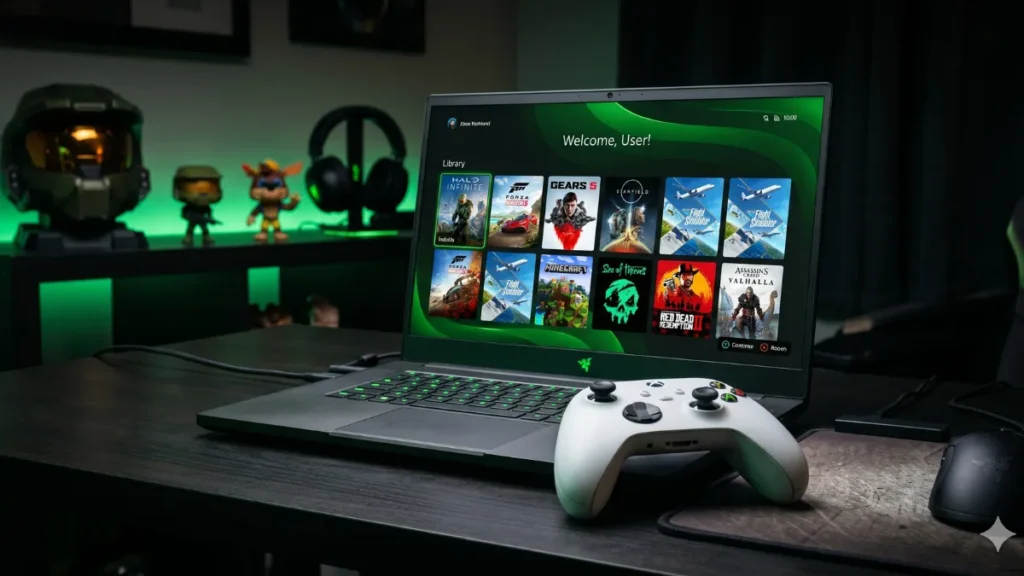
Xbox Mode formerly known as “Full Screen Experience” (FSE) on handheld devices completely replaces the traditional Windows desktop with a console-style gaming interface. Think of it as bringing the Xbox Series X dashboard experience directly to your PC.
Once enabled, the standard taskbar and desktop disappear, replaced by an Xbox-first home screen showing your full game library, recent titles, and the complete Xbox Game Pass catalog. The entire interface is optimized for controllers, meaning you can navigate everything using an Xbox One or Xbox Series controller without touching a keyboard or mouse.
With Xbox Mode active, you can browse and launch games, access a unified library combining Game Pass and installed PC titles, use Xbox Game Bar for performance monitoring, and switch back to the Windows desktop anytime through Task View.
How To Enable Xbox Mode?
Xbox Mode does not turn on by default after installing the update. Here is how to enable it:
- Open Settings on your Windows 11 PC
- Go to Gaming
- Click Xbox mode (first option on the page)
- Toggle Enable Xbox mode to ON
- Optionally enable Show Xbox mode in Task View to switch between Xbox and desktop easily
Friendster Relaunched: Social Media App Returns With Real-Life Focus
Not Everyone Will See It Immediately
Even after installing KB5083631, Xbox Mode may not appear on your device right away. Microsoft has confirmed this is a gradual rollout that could take anywhere from one day to a few weeks to reach all eligible PCs. To get it sooner, go to Settings → Windows Update and turn on Get the latest updates as soon as they are available.
What Else Is New In KB5083631?
Beyond Xbox Mode, this update brings a few other notable improvements to Windows 11.
File Explorer Fixes: A long-standing bug where File Explorer would ignore your preferred folder view settings when a folder was opened from another app has finally been patched. Microsoft has also extended native archive support to new formats including nupkg, xar, uu, and cpio — so you can extract these without third-party tools. The annoying white flash in dark mode when browsing “This PC” has also been fixed.
Haptic Feedback Expansion: Haptic signals now extend beyond clicks and taps to cover window actions like snapping and resizing. You will also feel haptic feedback when aligning objects in PowerPoint. Manage these from Settings → Bluetooth & devices → Mouse or Touchpad → Haptic signals.
PhilHealth Maternity Benefits Nearly Triple in Major 2026 Update
A Word On File Sizes
KB5083631 is a large download 5,122.5 MB for Windows 11 25H2 and 4,605.7 MB for 24H2, on both x64 and ARM64 architectures. Part of the reason for the ballooning size is that Microsoft has started bundling AI models within Windows updates, even when they are not actively used on your device.
Microsoft has confirmed no major issues with this update, so it is safe to install today if you want early access to Xbox Mode and the other improvements.

Anku is a Technology News writer covering Smartphones, AI, software, gaming, laptops, iOS updates, tech trends. He focuses on creating simple, informative, and reader-friendly news in Simple English Language.